A password keeper that never goes online.
KEEP/01 is a pocket device you build yourself. It makes strong passwords, keeps them encrypted behind your PIN, and can store your Bitcoin seed phrase as a second backup. No app, no account, no cloud sync.
- Wi-Fi and Bluetooth off
- About ₹2,000 in parts
- No soldering
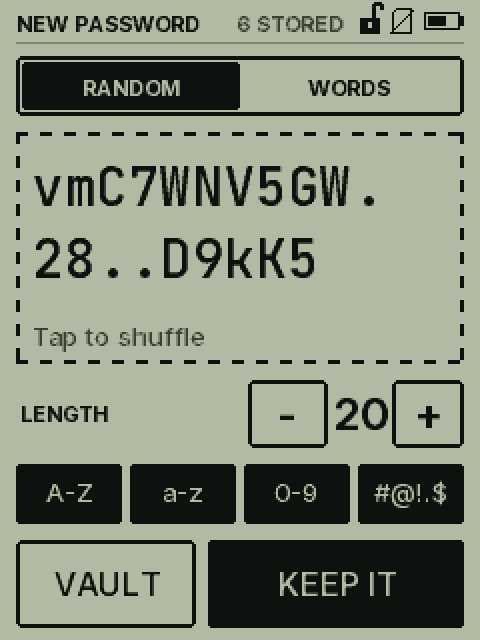
Pick the length and character sets, then tap to shuffle until you like it.
One device for every password you can't remember.
You have dozens of accounts. Writing passwords on paper isn't safe, and reusing one everywhere is worse. KEEP/01 remembers them for you, on a device that can't be reached from the internet.
Makes them
Random passwords from A–Z, a–z, 0–9 and the symbols #@!.$ that sites accept, or easy-to-type word passwords from the 2,048-word BIP39 list.
Keeps them
Name it and tap Keep. Everything is stored encrypted on the device. Replace a password and the old one stays alongside until you've changed it on the site.
Backs them up
An encrypted backup goes to the microSD card after every change, and to your phone through QR codes whenever you like. Both are safe to keep in Google Drive.
Two keys, one vault, no network.
A random master key encrypts everything. It's stored twice: once locked by your PIN for everyday use, and once by a 24-character recovery code that you write on paper.
- Radios stay offThe firmware switches Wi-Fi and Bluetooth off at boot and never turns them on. Backups travel by SD card or by QR codes on the screen.
- No wipe, just waitingFive wrong PINs are free. After that, each wrong guess adds a longer wait, so guessing becomes hopeless:
6th wrong PIN 24 hours 7th wrong PIN 48 hours 8th wrong PIN 72 hours, and so on - Backups you can uploadThe backup is locked with the recovery code, not your PIN, so it's safe in any cloud folder. Without the code it's random noise.
- Seed phrases, on your termsStore a 12, 18 or 24-word Bitcoin seed with checksum checking. Seeds need an 8-digit PIN, hide after 30 seconds, and stay out of backups unless you switch them in.
Back up to your phone. No cables.
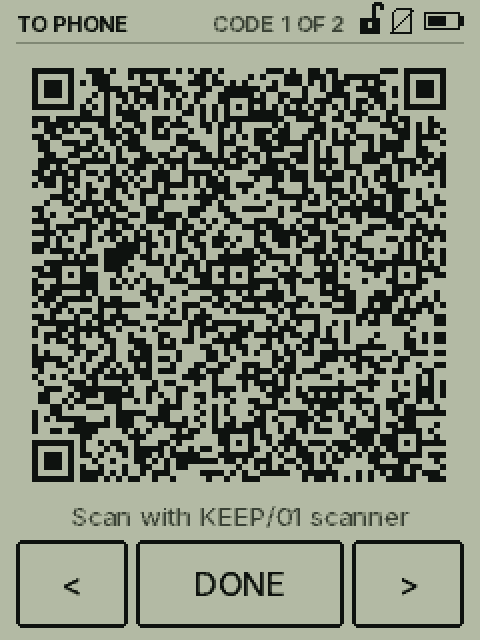
KEEP/01 shows its encrypted backup as a short loop of QR codes. The scanner page turns them back into the backup file on your phone, ready for Google Drive.
- On KEEP/01Unlock and open More, then Backup: Phone. The screen counts Code 1 of N and moves on every 1.6 seconds.
- On your phoneOpen the scanner, tap Scan with camera and hold the phone 15–25 cm from the screen until every square fills.
- Save itTap Save backup to download
keep01-backup.k01, or Share to put it straight into Drive.
The scanner runs entirely on your phone and is blocked from using the network, so the file can't go anywhere you don't send it.
Build your own in an afternoon.
KEEP/01 runs on a ready-made 2.8-inch ESP32 touch-screen board. You flash the firmware from your computer, plug in a battery, and print a case.
| Part | What to look for | Approx. price |
|---|---|---|
| Display board | 2.8" ESP32-32E, 240×320 resistive touch (LCDWiki/Elecrow "E32R28T", often sold as ESP32-2432S028). Has the touch screen, microSD slot, battery charger and BOOT key built in. | ₹1,200–1,800 |
| microSD card | Any 2–32 GB card, formatted FAT32 | ₹150–250 |
| Battery | 3.7 V LiPo 503450 (about 1,000–1,500 mAh), with protection and a 1.25 mm 2-pin plug | ₹250–400 |
| Case | 3D-printed front, back and LOCK button in PETG, plus 4 × M3 × 14 screws | ₹150–250 |
| USB-C cable | One that carries data, not charge-only | you likely have one |
| Total | about ₹2,000–2,500 | |
Install Thonny
Download the free Thonny editor from thonny.org and install it on your Windows, Mac or Linux computer. It flashes the board and copies files to it.
Put MicroPython on the board
Connect the board with a data cable. In Thonny, open Tools → Options → Interpreter, choose MicroPython (ESP32), then Install or update MicroPython (esptool). Pick the ESP32 / Espressif · ESP32 / WROOM build, version 1.24 or newer, and install it.
Copy the firmware
Unzip
keep01-firmware-esp32.zip. In Thonny, open View → Files and press Stop so the board shows its files. From the unzipped folder, right-click each of these and choose Upload to /:- main.py and bip39.txt
- every .mpy file (app, ui, hw, vault, backup, bip39, qr, sdcard)
- the whole fonts folder
Leave out the
toolsfolder. Don't put any.pycopies of those modules on the board, or they'll load instead of the faster.mpyfiles.Connect the battery
Plug the LiPo into the BAT connector. Check first that the red wire goes to the + mark beside it. The board charges the battery whenever USB-C is plugged in.
First start
Insert the microSD card and press RESET. Then:
- tap the three crosses to calibrate the touch screen
- choose New vault and set a PIN. Use 8 digits or more if you'll store a seed phrase.
- write down the recovery code on paper and type one group back when asked. It's shown only once.
Print and close the case
Order the parts from
keep01-case.zipfrom any 3D-printing service in PETG. Pick the back that matches your battery's thickness. Stick the battery in its pocket, lay the board screen-up on the posts, fit the front, and tighten the four M3 screws until just snug.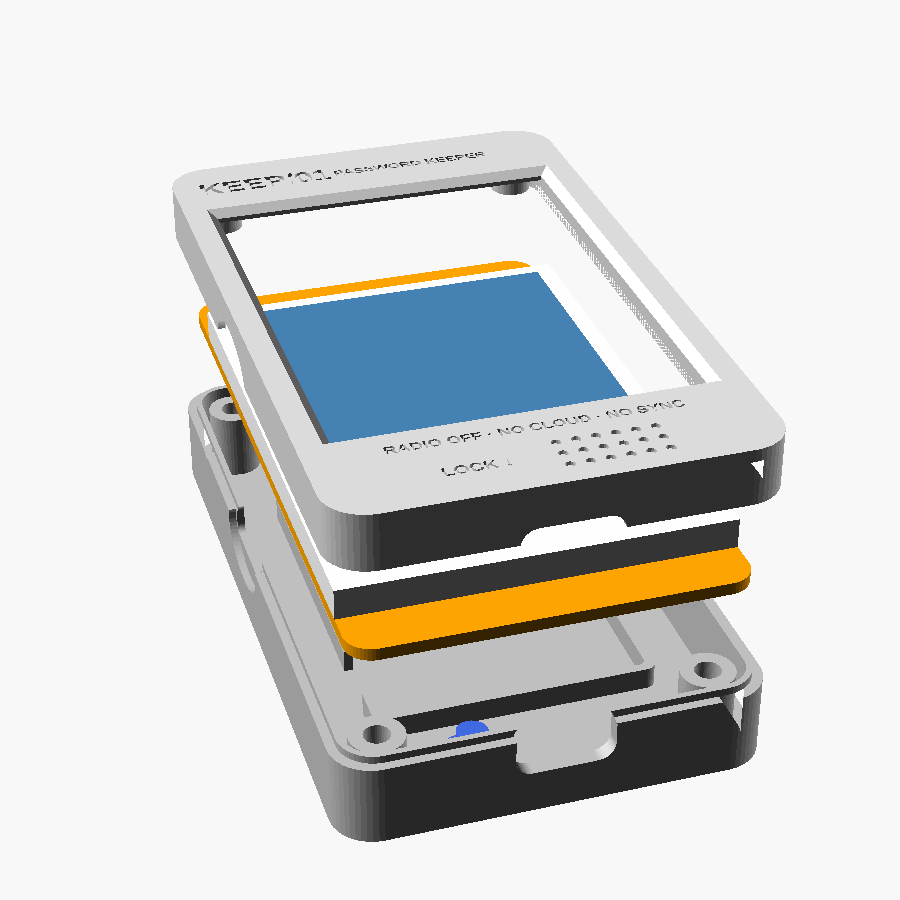
Close Thonny and use it
Unplug from the computer. From now on KEEP/01 starts by itself on battery or any USB charger. The BOOT key on the back is your LOCK button.
Good to know before you trust it.
Lost or broken device?
- Build a new KEEP/01 with the steps above.
- Copy your backup to the root of a FAT32 microSD card, named exactly
keep01-backup.k01. - Insert it, press RESET and choose Restore from card.
- Type your recovery code and pick a new PIN.
No new device yet? Run python recover.py keep01-backup.k01 on a computer to read the backup now.
Honest limits
- This is a hobby project, not an audited product. Keep your metal seed plate as the main backup for any large amount of Bitcoin.
- The ESP32's memory isn't encrypted. Someone who steals the device and has the skills could copy the chip and guess a short PIN on a computer. Use a PIN of 8 digits or more.
- If the device is lost, change your most important passwords and move any Bitcoin whose seed was on it to a new wallet.
- Use a charge-only cable or a power bank. Don't plug it into computers you don't trust.